 macOS · Command line · Free · Open source
A calmer iPhone Home Screen, from your terminal.
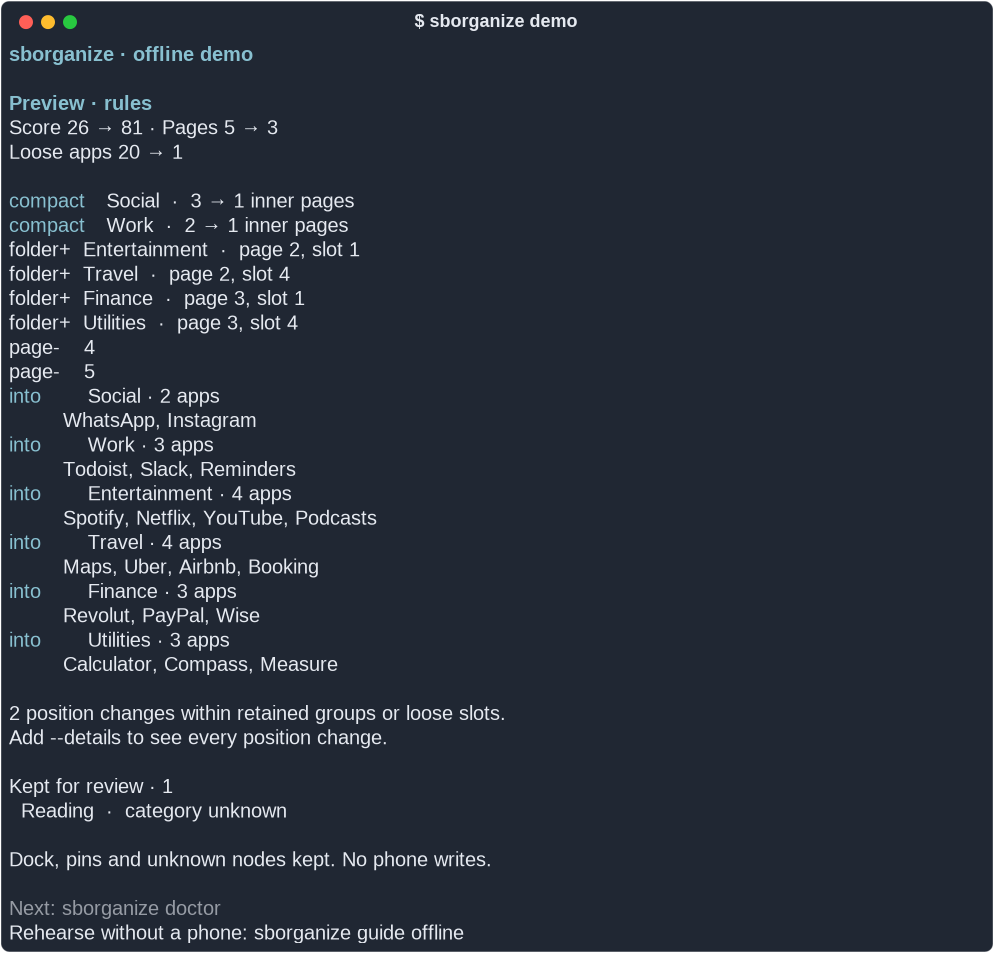
Connect your iPhone to your Mac, and sborganize groups your apps into useful folders. You see every change before it happens, and an exact backup is kept so you can go back. Local rules work without a model, an account or a network connection.
What it does
- Useful foldersGroups loose apps into folders by what they do, and keeps the folders you already have.
- Preview firstNothing changes on the phone until you have seen the plan. The default answer is No.
- Exact backupThe current layout is saved and verified before every write, and can be restored.
- Your categoriesRemember your own categories, folder names and pins in a local file, or design the whole Home Screen in one policy.
- Optional adviceApple's on-device model, or OpenRouter only when you ask for it. Rules need no credits.
- ProtectedThe dock, pins, widgets and anything it doesn't recognise stay where they are. No app data is read.
Good to know
Writing to the phone is experimental. iOS can rearrange layouts on its own, and the full workflow has been completed on one development iPhone so far. Restoring a backup on hardware is not yet validated.
sborganize reads only the Home Screen layout: app names and IDs, folders and positions. It never looks at photos, messages, health records or what's inside your apps, and it uninstalls nothing. Plans and backups stay in ~/.sborganize/ on your Mac. Details are in the privacy notes and the safety guide.
Get sborganize
Install with pipx, then try the demo, which needs no phone:
pipx install 'sborganize[device] @ git+https://github.com/tangfy97/sborganize.git@v0.1.0a10'
sborganize demo
Then connect your iPhone by USB, unlock it and choose Trust This Computer. sborganize guide walks you through the rest.